
The image above was created using AI. More specifically, this was the first image generated by Runway, when given the prompt “Amazon Fake Review Detector”.
For my final project in my Applied AI in Python course, I wanted to address a real-world issue that is extremely prevalent today. In recent years, fake reviews have emerged as a pervasive and concerning issue plaguing e-commerce platforms in the contemporary digital landscape, even influencing “around $152 billion in global spending on lackluster products” in 2021. As online shopping continues to gain popularity, the reliance on reviews as a decision-making factor for making online purchases has surged, making them an integral part of the consumer experience.
However, the rise of fake reviews has tainted the authenticity and reliability of user-generated content on these platforms. A primary challenge posed by fake reviews is the distortion of product perception. Consumers heavily depend on reviews to gauge the quality, functionality, l buyers are misled into making decisions based on fabricated positive feedback or negative criticism, resulting in an inaccurate representation of the product.
The solution is simple: build a text classifier that will detect whether a review is human or computer generated! In this post, I will be walking us through the steps I took to set up the training data fo r this classifier, and in the next post, I will cover how I trained the classifiers and chose which ML algorithm to use for the final product.
The very first thing we needed to do to even start this project was to find a good dataset with both computer generated and human generated reviews. Fortunately, I found one that has over 20,000 labelled reviews of each type, which is perfect for this project. So I opened it up:

That’s actually really good! But to circle back to the problem I’m actually trying to solve, I want to be able to detect whether a review is human or computer generated, regardless of the product category or out-of-five star rating. To remove this information from the dataset, I read this file as a pandas dataframe, and dropped the columns “category” and “rating”:
df = pd.read_csv(url)
df = df.drop(labels=['category', 'rating'], axis=1)
Now, the dataset looks like this:
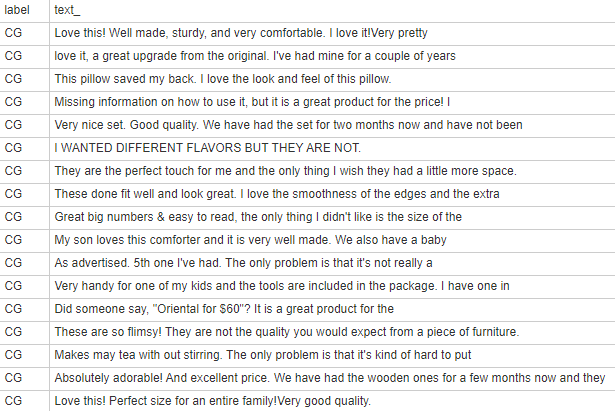
Let’s print a more detailed description:
print("Items per category:")print(df['label'].value_counts())print("More detailed dataset description:")df.describe()
This gives us:
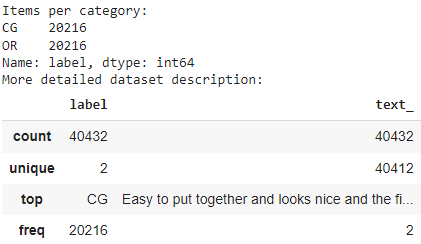
Now, we need to split our data into training and validation sets. The Sci-kit Learn python library already has a function for this:
from sklearn.model_selection import train_test_split X_training, X_val, Y_training, Y_val = train_test_split(df['text_'], df['label'], test_size=0.2)
Lastly, we can convert out text data using a TF-IDF vectorizer. A TF-IDF (Term frequency-inverse document frequency) vectorizer is “a measure of originality of a word by comparing the number of times a word appears in document with the number of documents the word appears in.” The Sci-kit Learn python library also already has a function for this:
from sklearn.feature_extraction.text import TfidfVectorizer vectorizer = TfidfVectorizer()X_training_tfidf = vectorizer.fit_transform(X_training)X_val_tfidf = vectorizer.transform(X_val)
Beautiful! In this post, we’ve covered the data preparation process for this project, and in the next post, I will talk about how I trained the classifiers and chose which ML algorithm to use for the final product. See you then!
 Hardwired Eloquence